
A shipment arrives, along with the packing slip. Before the goods go into the warehouse, someone in the receiving department checks: Does this match the order? Often, it doesn’t match at first glance. Then the search begins in the inventory management system, line by line. You can’t just leave it be: After § 377 of the German Commercial Code (HGB) The goods must be inspected „immediately upon delivery.“.
Counting and visual inspection remain the responsibility of the receiving department. We have automated the process of reconciling documents for a machinery manufacturer. This article explains the rules behind this process using six examples, including partial deliveries.
Why a Simple Comparison of the Delivery Slip and Purchase Order Fails
The header information on a delivery slip is rarely a problem. The supplier, date, and delivery slip number can be entered using a Optical Character Recognition (OCR) for Delivery Slips It's easy to read them automatically. Things get tricky with the line items, though, because there are four typical ways in which the delivery slip and the purchase order differ:
- Third-Party Part Number: The supplier prints its own item number. Your material number will only appear if the supplier has entered it into its system.
- Alternative spelling of the order number: „0004599000101,“ „4599000101,“ and „4599000101 / 20“ all refer to the same order.
- Split Order Lines: A material was ordered in a purchase order for two line items, for example, 18 and 12 pieces. The supplier delivers 30 pieces in a single line.
- Partial deliveries: Of the 25 meters, 15 will be delivered first; the rest will follow later.
A comparison that simply searches for a delivery note line in all open orders will either find nothing or the wrong item in these cases. For example, if it finds the same material in another order, the line appears to be confirmed, even though it belongs to a different transaction.
The order in which a delivery note line is assigned
That is why our matching process always starts with the order number. Only then does it search for the corresponding order line item. The process is based on a list of open order line items from the inventory management system, the ERP system. It contains the order number, line item number, material number, quantity, and unit.
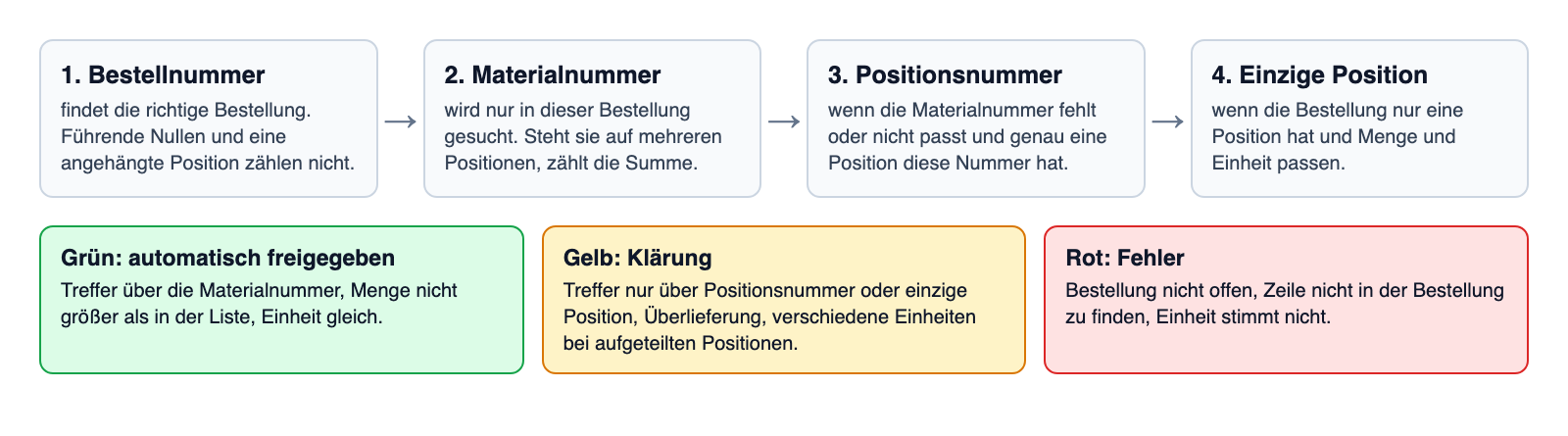
First, the system uses the order number to find the correct order. It compares only the first sequence of digits, excluding leading zeros. „0004599000101“ and „4599000101 / 20“ both point to the same order. If the order number is missing or the order is not open, the delivery note turns red.
Then it searches for the order line with the same material number, but only within that specific order. A material from another order will never be found this way.
Sometimes the material number is missing, or it isn't listed on the purchase order. In that case, there are two other options:
- Item Number: The supplier prints the line item number, and exactly one order line item has that number.
- Single item: The order has only one line item, and the quantity and unit match exactly.
Matches via these two methods are never guaranteed. The line is always assigned to one person. If the delivery note and the purchase order contain different material numbers, the system does not even attempt to match them. If only the supplier's item number is provided, the line is treated as if the material number were missing.
Partial Delivery and Split Order Line: When 18 Plus 12 Equals 30
Sometimes a material appears in multiple line items on the same order—for example, in two line items with 18 and 12 pieces, respectively. In that case, the reconciliation adds them together. Thus, 30 pieces delivered is exactly the quantity ordered. If the supplier prints the line item number, only that one line item is counted. If the line items have different units of measure, the reconciliation does not combine them. The line is then flagged for clarification.
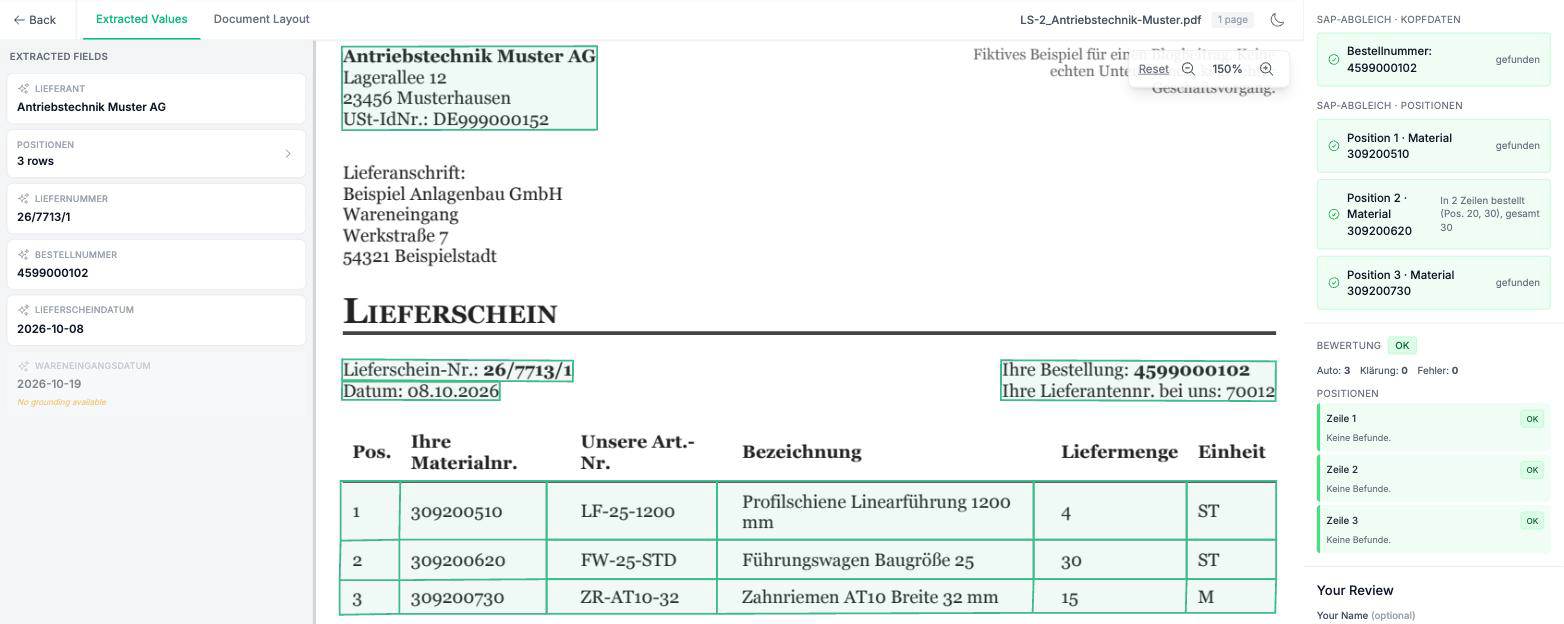
Partial deliveries are allowed: Receiving fewer items than listed is acceptable; receiving more constitutes an overdelivery and will be reviewed. The tolerance for this can be adjusted. For the machine manufacturer, it is currently set to zero.
There is one limitation: The system compares the quantities against those in the list. It does not automatically deduct previous partial deliveries. Therefore, the list must contain the outstanding quantities and be up to date. The system always checks against the status of the most recent export.
Green, Yellow, Red: When a Person Checks
The software doesn't decide everything on its own. Each line is assigned a color, and that color determines whether a person sees the delivery slip. The entire delivery slip is assigned the worst color among its lines:
- Green, no people needed: The line was found using the material number; the quantity is not too high, and the unit is correct. The delivery note is automatically released.
- Yellow, a person confirmed: Something isn't quite right. The line item was found only by its line number or as a single line item; more was received than was ordered; or split line items have different units.
- Red, a person explains: Something fundamental is wrong here. The order number is missing, the order isn't open, the line item isn't in the order, or the unit is incorrect.
For yellow and red statuses, the person in charge receives an email with a link to the review screen. There, next to the document, they can see whether and how each line was identified and why it isn’t green. For example: „The item was assigned based on the order line, not the material number.“ The person then approves or rejects the delivery note.
This principle is called Human in the Loop: People test precisely where the software is vulnerable.
An example with six delivery slips
We’ll illustrate how this all works using six fictitious delivery slips. They come from three fictitious suppliers and are modeled after the project at the machine manufacturer. There are four open orders with a total of ten order lines. Each delivery slip illustrates a typical scenario:
| Delivery note | Case | Assignment | Traffic light |
|---|---|---|---|
| 1 | Complete delivery | Part Number | Green |
| 2 | 30 pieces versus 18 + 12, plus 15 out of 25 m | Material number, two order lines | Green |
| 3 | 450 washers instead of 400 | Part Number | Yellow |
| 4 | Only the item number is printed | Item Number | Yellow |
| 5 | No material number; order with a single order line | single order line | Yellow |
| 6 | Order not open | none | Red |
Each delivery note is assigned the color appropriate for its case. Delivery note 1 is processed without a check and without an email. For delivery note 3, the automatic check reports: „The delivery quantity of 450 exceeds the remaining quantity of 400 (tolerance ±0).“
The documents are synthetic and simple in design. Genuine delivery slips with stamps, handwriting, and multi-page packing lists are harder to read. However, the rules for classification remain the same.
Can the delivery note reconciliation feature be used at your company as well?
Use these questions to determine whether this approach works for you in your everyday life.
- Do you manually verify the items on the delivery slip against the purchase order?
- Do your delivery slips often list the supplier's item number instead of your material number?
- Do you receive orders in multiple partial shipments?
- Can your inventory management system export open order lines as a list (CSV, Excel) or via an API interface?
- Is a person supposed to see only the unclear delivery slips?
The delivery note reconciliation is the first step in the process. If it is in order, then the Digital invoice verification easier. That's because when you reconcile the order, delivery slip, and invoice, the delivery is already confirmed.
Conclusion
A delivery note can be automatically verified against the purchase order. To do this, the verification process simply needs to search the correct purchase order. It must recognize split line items and partial deliveries. And it must assign any ambiguous entries to a specific person. Then, unambiguous delivery notes will be processed automatically without any further action. Only cases that are inconsistent or unclear remain in the goods receipt process.
Would you like to know how this works with your delivery slips and inventory management? Please contact us. We’d be happy to review a few of your documents.

 EN
 DE
 ES
 FR