
Before an AI can understand a document, the text within it must be recognized. This is done by text recognition, or OCR (Optical Character Recognition) for short. It runs either on a cloud service or on your own hardware.
The choice seems like a matter of data protection. But it’s also a matter of wait time. We tested both methods using the same genuine documents. This post presents the numbers, the reasons, and our decision.
The setup: a server in Germany, a service in the EU
"On-premise" means that text recognition runs on your own hardware rather than on the cloud provider's servers. We conducted our tests on our own server in a data center in Germany. It works exactly the same way in a customer's data center.
The server is a single machine with 8 processor cores and approximately 65 GB of RAM. The detection software runs on it as a container—that is, as a self-contained software package. The same provider also offers this detection service as a cloud service. Documents and results are stored only in the server’s RAM; nothing is saved to the hard drive.
For comparison, we used the same provider’s cloud service located in a data center in the EU. It is accessed via an OCR API. We conducted our tests using publicly available business documents, including data sheets, annual reports, fund reports, and safety data sheets.
All times apply to comprehensive OCR recognition, which also captures the document layout, tables, checkboxes, and every text position—in other words, it goes beyond simple text recognition. The time was measured from submission to the final result, including the upload.
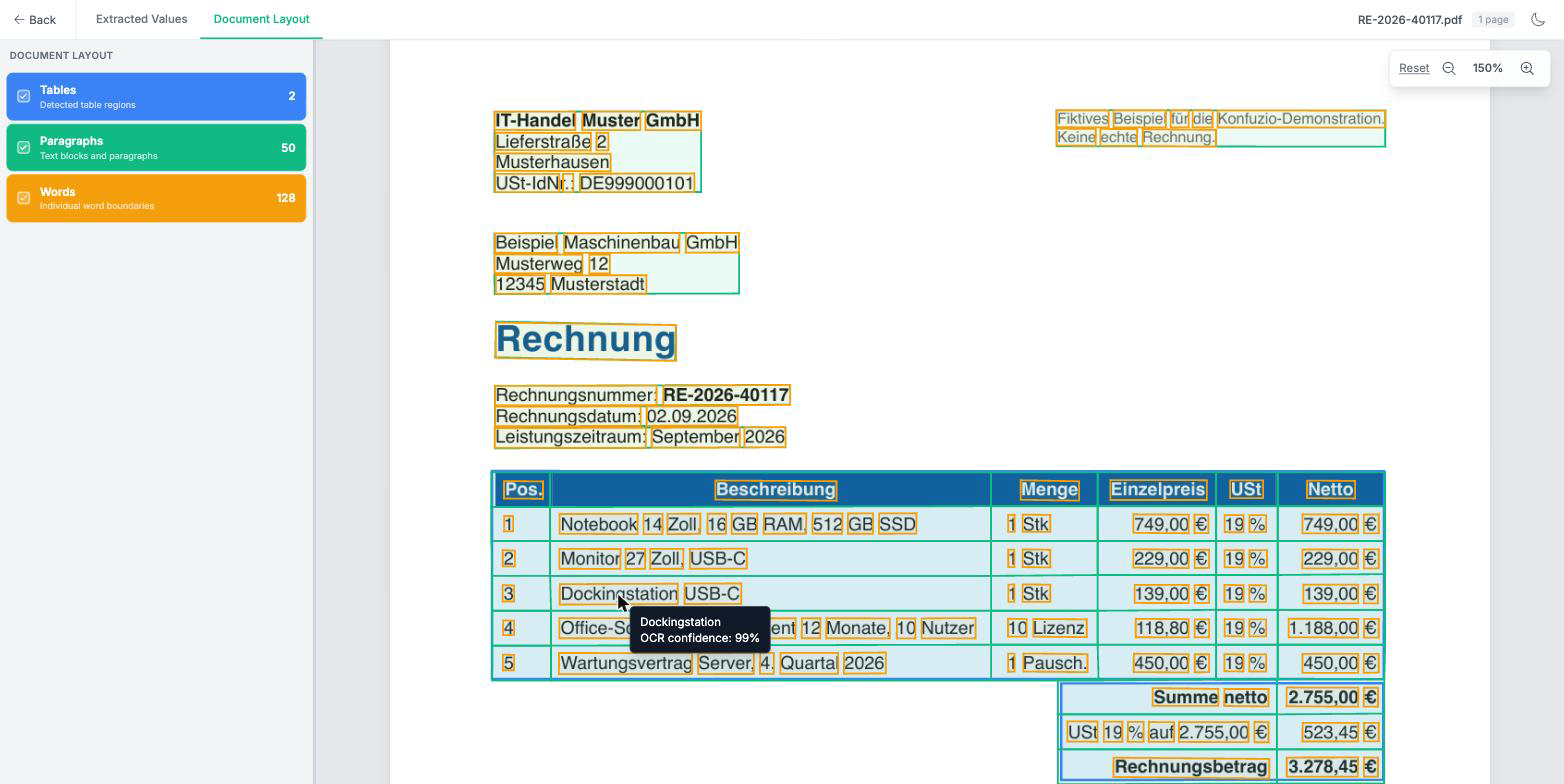
Here's what the result looks like in the „Document Layout“ view of our document: tables, paragraphs, and individual words are highlighted. When you hover your mouse over a word, its readability score appears—in this case, 99 percent for „docking station.“.
The measured values
We ran the tests on October 29 and November 2, 2026, using the same files for both runs. The numbers are medians, meaning they represent the middle values: half of the documents processed faster, and the other half slower. For the long documents, there was one run each.
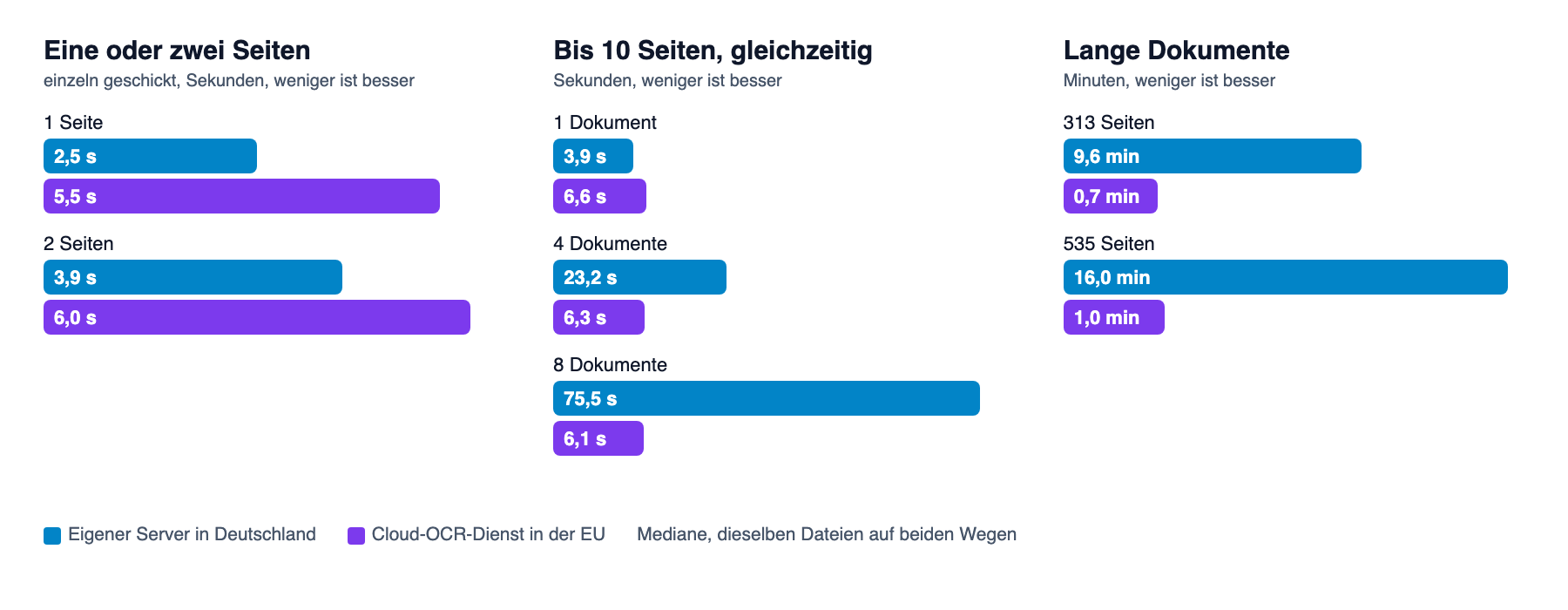
Short documents, one at a time. Ten single-page and nine two-page documents were sent alternately in both directions over three rounds. A single page loaded in 2.5 seconds on the local server and in 5.5 seconds in the cloud. For two pages, the times were 3.9 and 6.0 seconds. In all 57 pairs, the local server was faster.
Multiple documents at the same time. For documents up to ten pages long, sent individually, our own server took 3.9 seconds, while the cloud took 6.6 seconds. When four were sent simultaneously, it took 23 seconds on our own server and 6.3 seconds in the cloud. With eight sent simultaneously, the times were 75.5 seconds versus 6.1 seconds. The cloud consistently takes about six seconds, regardless of how many documents are sent.
Long documents. This is where the difference is greatest. A 313-page document took 9.6 minutes on the local server and 43 seconds in the cloud. For a 535-page document, the times were 16.0 minutes versus 59 seconds.
Why Long Documents Are Slow on a Server
A single server has a fixed processing capacity. With layout recognition, our server can process 36 to 48 pages per minute; over the course of an entire night, the average was 37. We can only process more with additional servers.
Based on our observations, the cloud service distributes the work across many machines. As a result, 535 pages were returned in 59 seconds. For a single short document, this distribution isn't very helpful. In that case, what matters is how quickly a job starts, and our own server was faster in our test.
There is also a queue on the server itself. It processes jobs in order. If long documents were at the front of the queue, a two-page document would wait just under ten minutes. It was read quickly, but its turn never came.
A single job that ran for more than about an hour terminated unexpectedly. That's why anyone who processes long documents on their own hardware divides them into sections beforehand.
On-Premise OCR: Pros and Cons
There are three points in favor of using our own hardware:
- Place of Processing: The documents do not leave the data center where the server is located.
- Short response time: It took 2.5 seconds to load a page, and 5.5 seconds in the cloud.
- Fixed hardware costs: A machine costs a fixed amount each month, regardless of how much it is used.
There are four arguments against this:
- Limited Performance: A server reads about 40 pages per minute using layout recognition.
- Queue: A long document slows down the short ones if no one is managing the order.
- Operation: Updates, reboots, and monitoring are the responsibility of the operator. If a single server fails, no other server takes over.
- No savings per page: With our provider, the site costs the same whether it's hosted on our own hardware or in the cloud. The hardware costs extra.
Cloud OCR API: Pros and Cons
There are three reasons to choose the cloud service:
- Speed Under Load: Even with eight documents open at the same time, the response time remained around six seconds. 535 pages were read in 59 seconds instead of 16.0 minutes.
- Not in operation: No dedicated server, no updates, no monitoring.
- Pay-as-you-go: Billing is per page. There is no need to keep a machine on standby for rare peak loads that would otherwise remain unused.
There are three arguments against this:
- The documents leave the building: The provider processes the data in its data center. This requires a data processing agreement in accordance with Article 28 of the GDPR.
- Access from Abroad: The following applies to providers subject to U.S. law 18 U.S. Code § 2713. Upon order, they must back up or disclose data, „regardless of whether such communication, record, or other information is located within or outside the United States.“ In other words: it doesn’t matter whether the data is located in the U.S. or not. Simply being located in the EU does not, by itself, protect against this access.
- Upload Limits: When uploading two files—one 7 MB and the other 15 MB—the upload of one section timed out. A second attempt was successful.
The article describes the general balancing of interests On-premise vs. cloud. The cost of text recognition per page is listed in OCR Costs at a Glance.
The Challenge of Long Documents
We could simply scale up our own server. To distribute long documents across multiple machines, as is done in the cloud, we would need roughly ten such machines. That would cost about 1,000 euros a month just for text recognition.
However, long documents with hundreds of pages are rare for us. The machines would be idle most of the time. We therefore decided against the expansion.
Instead, we offer both options. Users who allow processing only in Germany will be assigned our server in Germany. A document of about 300 pages will then take 9.6 minutes to process instead of 43 seconds. Users who allow processing within the EU will be assigned the cloud service. For more information on running the service on your own hardware, see On-Premise AI.
Where do you stand?
- Do your documents arrive one at a time throughout the day, or in a batch in the morning?
- How long is your longest document: ten pages or 500?
- Do your contracts allow for data processing in the EU, or only in Germany?
- Does the user have to wait for the result, or does the processing run in the background?
- Who handles updates and outages if the server is located at your site?
Conclusion
For individual short documents, a dedicated OCR server is faster: 2.5 seconds instead of 5.5 seconds per page, in all 57 comparisons. As soon as many documents arrive at once or a document has hundreds of pages, the cloud takes the lead. 535 pages took 16.0 minutes on our server, but only 59 seconds in the cloud.
Therefore, the decision doesn't start with the technology, but with the contract. Where are your documents permitted to be processed? That determines the approach, and the timelines can be planned accordingly. If you'd like to test your own documents using both approaches, please contact us.

 EN
 DE
 ES
 FR